When we have a new feature or enhancement to test out it will be released on the Beta version, allowing our users to test it out and feedback on their insights and experiences.
What is PPS Express Beta?
We are constantly working on updating and improving PPS Express to enhance your experience. Part of this process is the beta testing phase, beta testing is undertaken for computer products or software prior to commercial release. Beta testing is typically the last stage of testing and will normally involve sending the product out to users for real-world exposure.
By switching to beta as and when an update is available you are taking part in this testing phase. Although the system has already undergone rigorous in-house testing there may still be a few niggles or bugs present. If you do encounter any issues, please contact our support team on support@rushcliff.com who will be able to advise accordingly.
You can also send us your feedback at any time by clicking the support and feedback button at the bottom of your window.
You can choose to switch between a beta update and the previous version of PPS Express at any time by returning to this settings screen and acting accordingly.
Accessing the Beta Update
Navigate to your Settings menu and then click on System Settings where you will see Beta Access.
This tab will be available if a Beta update is available with some of the latest features and enhancements to try out.
Click Give me Beta Access to update to the beta. You can switch back to the general release at any time by coming back to this tab.
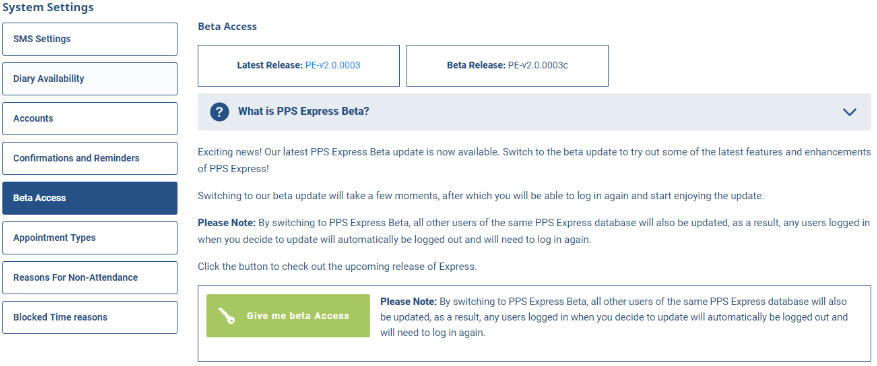
Important: By switching to Express Beta, all other users of the same Express database will also be updated, as a result, any users logged in when you decide to update will automatically be logged out and will need to log in again.